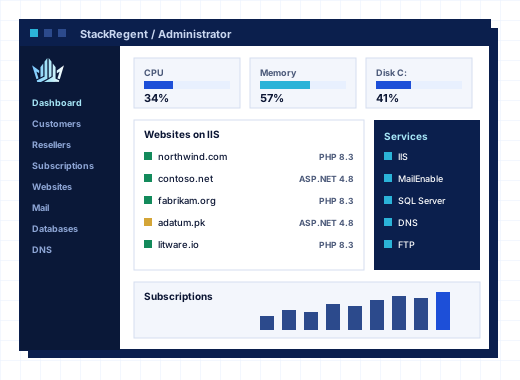
What StackRegent is#
StackRegent is a Windows hosting control panel for Windows Server 2016, 2019, 2022 and 2025. It installs on a single server and manages the services a Windows web host actually runs: IIS websites and application pools, PHP and ASP.NET, Node.js through iisnode, MariaDB and SQL Server Express, MailEnable mail with Roundcube webmail, Microsoft DNS and the Microsoft FTP Service. Server Core installations are supported too, without IIS Manager or the tray app.
The panel has three levels in one product. Administrators run the server. Resellers get their own customers, service plans and branding. Customers get a panel for their websites, mailboxes, databases, files, backups and scheduled tasks, with users and roles they can hand out to their own staff. Every plan includes all three levels and every feature; plans differ only in how many hosting accounts the server may hold. See pricing for the current plans.
Why we built a hosting panel for Windows#
Linux hosting has a long list of mature control panels. Windows hosting has had far fewer, and many of the ones that exist treat Windows as a port of a Linux design. We wanted a panel that starts from how Windows Server works:
- IIS first. Each subscription runs in its own IIS application pool under its own Windows user, with PHP through FastCGI as that same user and a locked
php.iniper site. - Windows-native limits. CPU, memory, disk I/O and process caps are enforced with Windows job objects, so one busy account cannot slow down the rest of the server. See resource limits and isolation.
- Windows-native secrets. Passwords and keys the panel stores are encrypted with Windows DPAPI.
- A way out of Plesk for Windows. The Migration & Transfer Manager moves subscriptions from Plesk for Windows server to server, and the Backup Manager imports Plesk backup files. The migration page and the comparison with Plesk explain both.
The result is a panel a Windows administrator recognizes: the services, permissions and tools are the ones already on the server, managed from one place instead of a dozen consoles.
The rules behind every release#
A control panel runs with full control of the server, so a few decisions are fixed and do not change from release to release.
Security comes before convenience#
New features are reviewed for what they expose before they are added. The panel never follows junctions or hard links when it works on files, firewall changes roll back by themselves if the panel stops answering, and administrator access can be limited by IP address and protected with TOTP two-step sign-in. The security page explains how the product and the company handle security.
Updates are signed and come from one place#
Releases are delivered only from the StackRegent license server. Each package is signed with the StackRegent release key, and the panel checks the size, SHA-256 hash and signature before it installs anything. The one-line installer makes the same checks. Updates are free while a license is active.
A license problem never takes websites offline#
If a license lapses, the panel enters restricted mode: administrators see only the license page and cannot add accounts or install updates. Websites, mail, DNS, databases and the customer and reseller panels keep working as before. Your customers do not pay for a billing mistake.
Every plan has every feature#
There are no feature tiers and no paid add-ons for the reseller level, the WordPress Toolkit, remote backup storage or the REST API. Plans differ only in the number of hosting accounts, billed monthly or yearly, and a free 10-day trial with 3 accounts needs no card. The included free page lists what comes with every license.
The team behind StackRegent#
The team that makes StackRegent also makes CoreInto, a billing, automation and support system for hosting companies, and intoPanel, a hosting control panel for AlmaLinux. The StackRegent store, client area, licenses and support tickets run on CoreInto at panel.stackregent.com, so we use our own software to sell our own software every day.
StackRegent is an independent product. It is not affiliated with Microsoft, or with WebPros and its Plesk and cPanel products.
Where to find things#
- Documentation and knowledge base: install guides, requirements and how-tos at docs.stackregent.com.
- Developers: the REST API, API keys and the command line at developers.stackregent.com.
- Community: the user forum and feature ideas at community.stackregent.com.
- Service status: the license server and update delivery at status.stackregent.com.
- Release notes: what changed in each release at docs.stackregent.com/release-notes.
How to reach the StackRegent team#
Write to info@stackregent.com for anything general, sales@stackregent.com for plans, quotations and partnerships, and support@stackregent.com for technical help and security reports. License holders and trial users can open a ticket in the client area, where every answer stays with the license it concerns. The support page lists every way to get help, and the contact page has a form for each kind of question.
Frequently asked questions
Who makes StackRegent?
StackRegent is made by the team behind the CoreInto billing system and the Linux control panel intoPanel. Orders, licenses and support tickets for StackRegent are handled at panel.stackregent.com.
Is StackRegent affiliated with Plesk, cPanel or Microsoft?
No. StackRegent is an independent product. It runs on Windows Server and can migrate accounts from Plesk for Windows, but it is not affiliated with Microsoft or with WebPros, the owner of Plesk and cPanel.
Which Windows Server versions does StackRegent run on?
Windows Server 2016, 2019, 2022 and 2025, including Server Core. The lifecycle policy explains how long each version stays supported.
Is StackRegent open source?
No. StackRegent is commercial software licensed per server by subscription. It has a REST API with an OpenAPI 3 description and a command line tool, so you can automate and integrate it without changing its code.
Can I try StackRegent before I buy?
Yes. The free trial runs for 10 days with 3 hosting accounts and every feature, and needs no card. It installs with the same one-line command as a paid license.